

Smarter Than Your Average Home
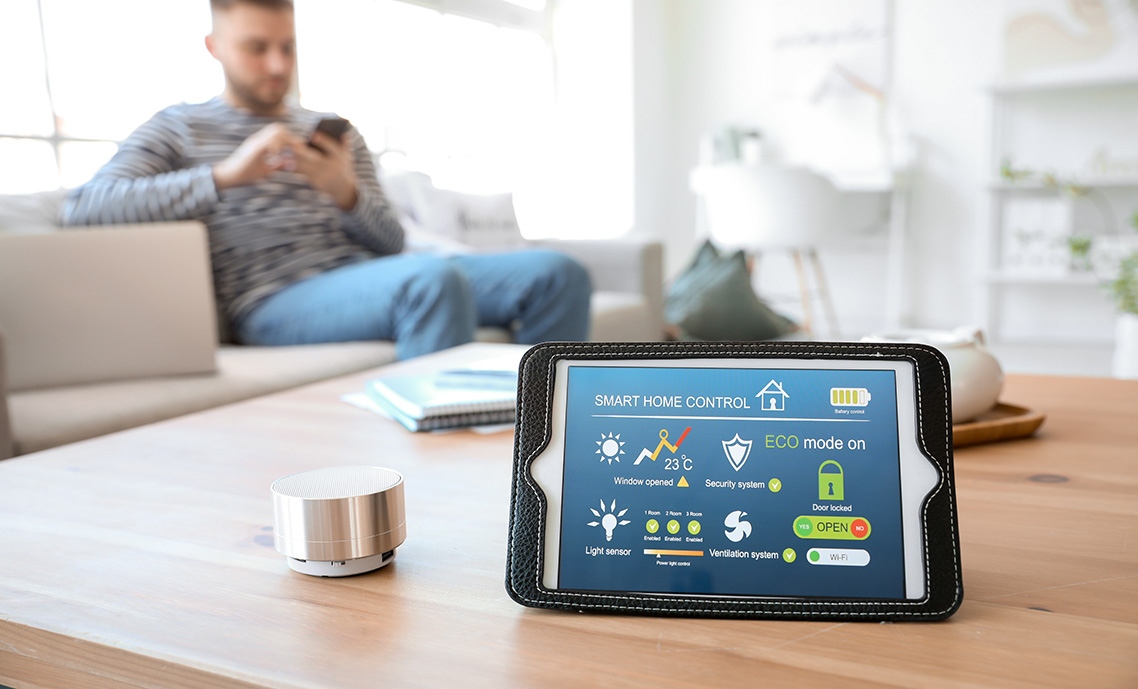
Smart home systems unify lighting, HVAC, access control, environmental sensing, and energy management into a responsive infrastructure that adapts to occupant behavior, schedules, and environmental conditions. These systems support automation, remote access, predictive maintenance, and sustainability tracking across both single-family homes and multi-unit developments. Deployment requires structured cabling, secure interfaces, and compliance with electrical, fire, and interoperability standards.
The content that follows outlines key considerations, deployment methods, and system strategies relevant to connected residential environments.
1. What is a smart home and why does it matter?
A smart home is a residence where connected systems—lighting, HVAC, security, energy management, entertainment, and environmental sensing—communicate through a unified network. These systems automate tasks, respond to occupant behavior, and provide real-time data to improve comfort, efficiency, and safety. Smart homes support energy savings, accessibility, remote visibility, and long-term scalability as new devices and standards emerge.
2. Which systems are integrated in a smart home—and where are they deployed?
Smart homes integrate multiple subsystems across different residential zones. Typical systems include:
- Lighting control — switches, dimmers, occupancy sensors, smart fixtures
- HVAC and environmental control — thermostats, humidity sensors, air quality monitors
- Security and access control — smart locks, cameras, sensors, intercoms
- Energy management — smart panels, load controllers, solar/battery integration
- Audio/video distribution — whole-home audio, media rooms, streaming hubs
- Water management — leak detection, shutoff valves, irrigation control
- Appliance integration — smart ovens, washers, dryers, refrigerators
These systems are deployed throughout the home based on function and zone requirements:
- Mechanical spaces — HVAC controls, smart panels, network gear
- Living spaces — lighting, AV, sensors
- Entry points — locks, cameras, intercoms
- Utility areas — water sensors, shutoff valves
- Outdoor zones — irrigation, lighting, perimeter cameras
This zoning ensures each subsystem is installed where it delivers the most value.
3. How does infrastructure vary by space type?
Infrastructure differs by room function and device density. Living rooms require AV wiring and lighting control; kitchens support appliance integration and leak detection; bedrooms use comfort controls and security sensors; bathrooms require humidity and leak monitoring; garages support EV charging and door controllers; outdoor areas require weatherproof enclosures and irrigation control. Each space has unique power, cabling, and environmental needs.
4. How is cable management handled across different home zones?
Cable management ensures safety, serviceability, and scalability. Effective methods include structured pathways, compliant wall and ceiling routing, organized racks, proper slack management, and environmental protection for outdoor or moisture-prone areas. Construction type and ceiling access influence routing choices, especially in retrofits.
5. How are cables and devices labeled for traceability and upgrades?
Labeling supports serviceability and reduces troubleshooting time. Best practices include:
- Permanent labels on both cable ends
- Device labels for sensors and controllers
- Panel schedules documenting terminations
- Color coding for cable types
- QR codes linking to documentation
Consistent labeling ensures future upgrades and diagnostics remain efficient.
6. How is structured cabling deployed in smart homes?
Structured cabling provides the backbone for data, control, and communication systems. Cabling types include:
- Cat6/Cat6A — networking, access points, cameras, AV
- Low-energy control wiring — sensors, switches, automation modules
- Coax — legacy RF distribution
- Fiber — high-bandwidth backbones or long runs
- Speaker wire — distributed audio
Routing considerations include home-run topology, separation of power and data, compliant penetrations, service loops, and accessible junction points.
7. Which interoperability standards support smart home devices?
Smart homes rely on open standards to ensure devices communicate reliably across manufacturers. Key standards include:
- Matter — unified IP-based compatibility
- Thread — low-power mesh networking
- Zigbee — lighting and automation mesh
- Z-Wave — sub-GHz mesh with reduced interference
- Wi‑Fi 6/7 — high-bandwidth connectivity
- Bluetooth LE — provisioning and short-range control
These standards reduce vendor lock-in and support long-term ecosystem stability.
8. How is network topology designed in smart homes?
Smart homes use hybrid wired/wireless topologies to balance performance and flexibility. Wired backbones connect stationary devices and access points; ceiling-mounted APs provide coverage; Thread or Zigbee support sensor meshes; channel planning reduces interference; VLANs segment IoT, guest, and core networks. This design ensures low latency and stable communication.
9. What enclosures are used to house smart home infrastructure?
Smart home equipment requires organized, protected enclosures. Common types include:
- Structured media enclosures — networking, patch panels, gateways
- Low-energy control enclosures — lighting modules, relays, automation hubs
- AV racks — amplifiers, switches, streamers
- Outdoor-rated enclosures — cameras, irrigation controllers
- Fire-rated enclosures — where required by code
These enclosures support cable organization, thermal management, and long-term serviceability.
10. How is power distribution handled for smart home systems?
Smart homes rely on multiple power types to support sensors, controllers, and automation platforms:
- Line-voltage circuits — lighting, outlets, HVAC, appliances
- Low-energy power — sensors, keypads, control modules
- PoE — cameras, access points, touchscreens
- UPS systems — network and automation uptime
- Load controllers — energy management
Proper power planning ensures reliability, safety, and future expandability.
11. How are smart home systems retrofitted into existing structures?
Retrofitting requires flexible infrastructure and non-invasive installation methods. Common approaches include:
- Wireless sensors and switches — minimal wiring
- Surface-mount raceways — conceal wiring
- Battery-powered devices — for inaccessible locations
- Bridge modules — integrate legacy systems
- Retrofit-friendly lighting controls — fit existing boxes
These methods minimize disruption while enabling meaningful automation.
12. What environmental systems do smart homes monitor and control?
Smart homes monitor and control environmental conditions to support comfort, safety, and efficiency. Key systems include:
- Temperature — thermostats, zoning
- Humidity — sensors, ventilation
- Air quality — VOC, particulate, CO₂ monitoring
- Ventilation — ERVs/HRVs, dampers
- Lighting environment — circadian, occupancy-based
- Water management — leak detection, shutoff valves
These systems work together to maintain a stable and healthy indoor environment.
13. How do users interact with and control smart home systems?
Smart homes provide multiple interfaces for occupant control and automation. Common interaction methods include:
- Mobile apps — centralized control
- Touchscreens — lighting, HVAC, security
- Voice control — hands-free operation
- Keypads and switches — local scenes
- Automation rules — schedules, occupancy, environmental triggers
- Remote access — off-site monitoring
Multiple interfaces ensure accessibility and support different user preferences.
14. How is system performance monitored, optimized, and maintained?
Smart homes use centralized platforms and edge devices to monitor performance and detect anomalies. Key functions include:
- Device health monitoring — connectivity, battery, firmware
- Energy analytics — load tracking, peak demand
- Environmental analytics — temperature, humidity, air quality
- Automation tuning — adjusting schedules and triggers
- Alerts and notifications — leaks, intrusions, abnormal conditions
- Remote diagnostics — troubleshooting without site visits
These capabilities ensure long-term reliability and efficient operation.
15. How are security, privacy, and cybersecurity managed in smart homes?
Smart homes require layered security to protect devices, data, and occupants. Core measures include:
- Encrypted communication
- Multi-factor authentication
- Role-based permissions
- Network segmentation
- Firmware updates
- Local data processing
- User-controlled retention
These protections maintain system integrity and occupant privacy.
16. How do smart home systems scale across multi-dwelling units (MDUs)?
MDUs require scalable infrastructure that supports multiple units and shared amenities. Key components include:
- Unit-level automation — lighting, HVAC, access, leak detection
- Building-level systems — common-area lighting, security, energy
- Centralized dashboards — monitoring device health and alerts
- Network segmentation — per-unit isolation
- Scalable provisioning — efficient onboarding/offboarding
These capabilities ensure reliability, privacy, and operational efficiency.
17. How are shared building systems and amenities integrated and managed?
Shared amenities rely on centralized automation for access, lighting, AV, and scheduling. Typical integrations include:
- Access control — residents, guests, staff
- Lighting and AV — community rooms, fitness centers
- Package management — smart lockers, notifications
- Parking and EV charging
- Outdoor amenities — pools, lighting, irrigation
Centralized control improves resident experience and simplifies operations.
18. How is network infrastructure designed for MDUs?
MDU networks must support high device density, resident privacy, and building-wide connectivity. Core design elements include:
- Per-unit VLANs — privacy
- Fiber or Cat6A risers — building backbones
- Strategic AP placement — hallways, amenities
- IoT segmentation — building systems vs. resident networks
- Redundancy — failover paths
Proper network design ensures performance and long-term scalability.
19. How is energy management handled in MDUs?
Energy management spans both individual units and shared spaces. Key components include:
- Smart thermostats — occupancy-based adjustments
- Common-area lighting — schedules, daylight harvesting
- Load monitoring
- Solar and storage integration
- Demand response
These systems reduce operational costs and support sustainability goals.
20. How are water systems monitored in MDUs?
Water management requires both unit-level and building-level monitoring. Typical components include:
- Leak sensors — kitchens, bathrooms, closets
- Automatic shutoff valves
- Water usage monitoring
- Irrigation control
- Mechanical room monitoring
These systems reduce risk and support efficient building operations.
21. How do MDUs handle device provisioning and turnover?
Provisioning workflows ensure consistent performance across units. Key processes include:
- Automated onboarding
- Automated offboarding
- Centralized dashboards
- Bulk updates
- Inventory tracking
These workflows reduce labor and maintain system consistency.
22. How is resident privacy protected in MDUs?
MDUs must enforce strict privacy boundaries between residents, staff, and building systems. Core protections include:
- Per-unit data isolation
- Role-based access
- Camera restrictions
- Encrypted communication
- Transparent policies
These measures maintain trust and comply with regulatory requirements.
23. How are building-wide alerts and notifications managed?
Alerts must reach the right parties quickly while avoiding unnecessary noise. Typical alert structures include:
- Unit-level alerts — leaks, device failures, access events
- Building-level alerts — mechanical issues, security events
- Escalation paths — staff or emergency services
- Notification tiers — resident vs. management
- Historical logs — compliance and diagnostics
Structured alerting ensures rapid response and reduces operational risk.
Smart home systems aren’t just about convenience—they’re about building resilient, responsive environments that meet today’s demands and tomorrow’s standards.
The information provided in this FAQ is for general informational purposes only and is not intended to replace official codes, standards, or project specifications. Winnie Industries products must always be installed and used in accordance with our product instruction sheets or designated training. Products should never be applied beyond their intended purpose or in a manner that exceeds specified load ratings. Proper fastening is critical to system integrity and functionality, requiring secure attachment to structurally sound components capable of supporting imposed loads. All installations must comply with governing codes, regulations, and job site requirements. Always consult your Authority Having Jurisdiction (AHJ) for specific regulatory guidance.